Most “free” AI image generators are a trap. You sign up, get three or five credits, generate two images, and then hit a paywall. That’s not free — that’s a demo. If you’ve been burned by that bait-and-switch before, this guide is for you.
Kimg AI is different. It has one of the most generous free credit systems available right now, and this article breaks down exactly how to squeeze every bit of value from it — no subscription, no credit card, no tricks.
I. The Free Credit Math Nobody Talks About
Before touching any settings or models, understand what’s actually being offered.
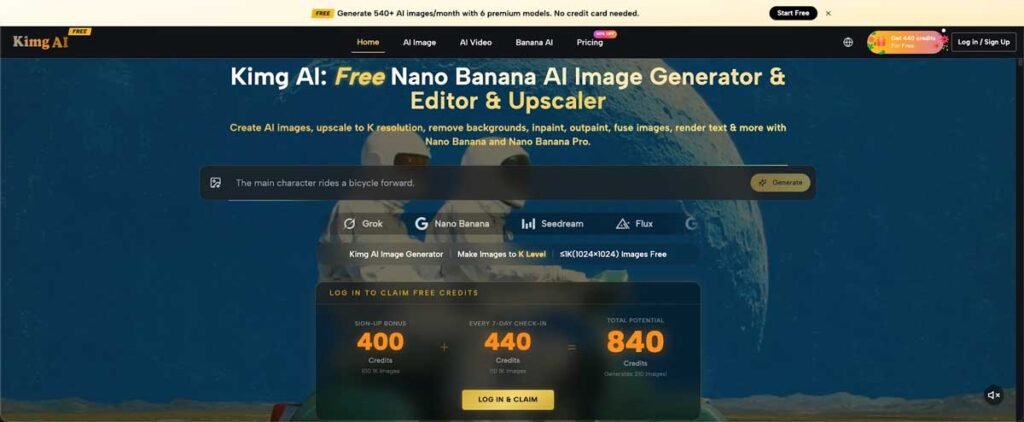
- Sign-up bonus: 400 credits, deposited the moment registration is complete. No payment info required.
- 7-day check-in reward: 440 credits, earned by logging in daily for one week straight.
- That’s 840 credits in your first week — enough to generate over 200 images using standard settings.
The weekly check-in system doesn’t stop after week one. Every week, logging in for 7 consecutive days keeps adding 440 credits. That translates to roughly 110 free images per week, indefinitely, as long as the habit sticks.
For students or casual users who just want to test AI image generation without committing to a paid plan, this is one of the rare setups where “free” actually means something.
II. What Those Credits Can Actually Buy
Credits aren’t locked to a watered-down model. On Kimg AI, free credits work across a wide range of models — including some that cost real money elsewhere.
Multiple top-tier models, one account
The model lineup includes Nano Banana Pro, Seedream 5.0, FLUX, GPT Image 2, and Grok Image — all accessible from the same interface. No need to manage separate accounts or compare pricing across five different sites.
Flexible switching mid-session
Users can switch between models within the same session. Testing how FLUX handles a portrait prompt versus how Grok Image interprets it takes seconds, not separate browser tabs and logins.
Video generation is in the mix too
After generating a still image, users can convert it to a short video using Veo 3 — also within the platform. That’s a significant perk, since standalone video AI tools usually charge separately.
III. Free vs. Paid: What’s Actually Different
Knowing what the free tier can’t do is just as useful as knowing what it can.
- Resolution: Free plan outputs are capped at 1K quality. The 4K option is reserved for paid members. For testing prompts, sharing drafts, or learning the ropes, 1K is perfectly usable.
- Credit cost per image: Different models and settings consume credits at different rates. Running a basic generation costs fewer credits than a detailed or high-resolution job.
- Access scope: Most popular models are available to free users. Some specialized or newly launched features may require a paid tier.
The takeaway: free credits are genuinely useful for exploration and prototyping, not just a teaser.
IV. Starting With Nano Banana Pro
For first-time users wondering which model to try first, Nano Banana Pro is a strong pick.
What makes it worth testing
Nano Banana Pro is designed for detailed, high-quality image outputs. It handles complex prompts well and is particularly popular for anime-adjacent aesthetics, character design, and stylized illustration work.
Reference image support
Nano Banana Pro supports up to 8 reference image uploads per generation. This makes it possible to maintain consistent character styles or visual themes across multiple outputs — useful for anyone working on a project rather than just one-off tests.
It’s free to try
With the sign-up credits alone, users can run a solid session with Nano Banana Pro before ever seeing an upsell. That’s the whole point — figure out if the model suits the workflow before committing to anything.
V. The Weekly Habit That Keeps Credits Coming
The 7-day check-in isn’t a one-time event. It resets weekly, meaning consistent users build up a steady supply of free credits.
- Week 1: 400 (sign-up) + 440 (check-in) = 840 credits
- Week 2 onward: 440 credits per week for daily logins
- At roughly 4 credits per standard image, that’s about 110 images per week at no cost
This kind of recurring free credit system is rare. Most platforms move users toward paid plans aggressively after the trial ends. Kimg AI‘s check-in model lets users stay on the free tier indefinitely — as long as they show up daily.
VI. Practical Tips to Stretch Credits Further
Getting 840 credits is one thing; not wasting them is another.
- Test prompts at standard settings first. Run a quick generation to check composition and style before committing to a more credit-heavy job.
- Use the multi-model access strategically. If one model isn’t interpreting a prompt the right way, switch to another before burning more credits refining the wrong output.
- Generate, then convert. If a still image works well, use the Veo 3 video conversion feature to get more mileage out of a single generation rather than creating a new one from scratch.
Conclusion
The free AI image generation space is full of false promises. Most platforms give users just enough to want more, then lock everything behind a paywall. Kimg AI is structured differently — 840 credits in the first week, 440 every week after, and access to a real roster of models including Nano Banana Pro, Seedream 5.0, FLUX, GPT Image 2, and Grok Image.
For students, hobbyists, or anyone who wants to seriously evaluate AI image tools before spending money, this is the closest thing to a legitimate free tier that actually delivers.
