
Imagine a sprawling home where Wi-Fi dead zones disrupt smart devices, streaming, and remote work. The frustration of a faltering connection in an upstairs bedroom or a dropped signal in a backyard office is a common challenge in larger properties. Traditional single-router setups often struggle to provide consistent coverage across expansive areas. Fortunately, mesh Wi-Fi offers a revolutionary solution, promising whole-home coverage and consistent performance. This comprehensive guide will demystify mesh Wi-Fi, providing the knowledge and steps to transform your large home into a haven of seamless, high-performance connectivity.
Understanding Mesh Wi-Fi: Beyond Traditional Routers
Mesh Wi-Fi networks create a unified, robust wireless signal across an entire property by employing multiple interconnected access points, known as nodes. These nodes communicate intelligently to eliminate dead zones and ensure consistent, high-speed internet access.
Unlike conventional setups that rely on a single router, mesh systems distribute the network load, offering superior coverage and reliability, especially in expansive or multi-story homes.
What is Mesh Wi-Fi and how does it work?
Mesh Wi-Fi is a sophisticated wireless networking system designed for seamless internet coverage throughout large areas. Instead of a single router broadcasting a signal, a mesh system uses several nodes that work together to form one cohesive network. One node connects directly to your modem, acting as the main router, while satellite nodes are strategically placed around your home. These nodes communicate with each other and the main router, creating a powerful, unified network that intelligently routes data through the most efficient path, ensuring a strong and stable signal everywhere.
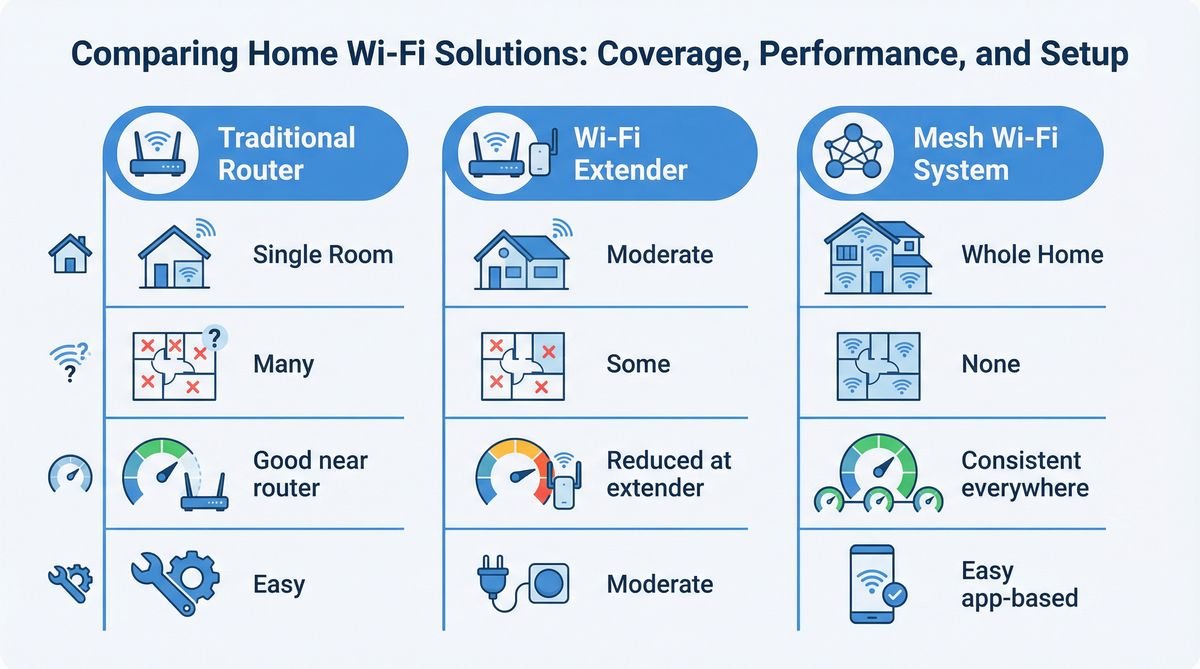
Mesh Wi-Fi vs. Traditional Routers: A fundamental difference.
Traditional Wi-Fi setups use a single router to broadcast a signal. While sufficient for smaller spaces, these routers often fail to provide consistent coverage in larger homes, leading to dead zones and slow speeds far from the central unit. Signal strength diminishes with distance and obstructions like walls. Mesh Wi-Fi systems overcome this by creating a distributed network where each node extends the network’s reach. Devices seamlessly connect to the nearest and strongest signal, effectively blanketing the entire property with reliable Wi-Fi.
Mesh Wi-Fi vs. Wi-Fi Extenders: Why mesh wins for large homes.
Wi-Fi extenders are a budget-friendly solution for extending a traditional router’s signal, but they often create a separate network name (SSID) and can halve bandwidth, leading to a less seamless and slower experience. Devices may not automatically switch back to the main router, requiring manual intervention. For large homes, multiple extenders can result in a fragmented network with inconsistent performance. Mesh Wi-Fi systems, however, operate as a single, unified network with one SSID. Devices intelligently roam between nodes without interruption, maintaining consistent speeds and a seamless user experience. This intelligent design makes mesh Wi-Fi a superior choice for comprehensive coverage and performance in large homes.
Planning Your Mesh Wi-Fi Deployment: Key Considerations for Large Homes
Effective mesh Wi-Fi deployment in large homes necessitates a thorough assessment of the property’s unique characteristics, including its layout, size, and construction materials, to accurately determine the optimal number and placement of nodes, ensuring comprehensive coverage and maximizing performance.
Understanding the latest Wi-Fi standards and establishing a realistic budget are also crucial steps in designing a robust and future-proof network solution tailored to your specific needs.
Assessing your home’s unique layout and size.
Before investing in a mesh Wi-Fi system, meticulously evaluate your large home’s physical attributes. Consider total square footage, number of floors, and signal-obstructing materials like thick concrete walls or metal fixtures. Sketching a floor plan to mark potential dead zones helps guide node selection and placement, providing a clear picture of your coverage needs.
Determining the optimal number of nodes.
The number of mesh nodes needed depends on your home’s size and layout. While most systems come in packs of two or three, larger or more complex homes may require additional units. A general guideline is one node per 1,500 to 2,000 square feet, but this varies with architectural challenges. For multi-story homes, strategically placing nodes on different floors, ideally staggered, ensures vertical coverage. The goal is overlapping Wi-Fi coverage, eliminating gaps and providing a strong signal throughout the entire property, including outdoor spaces.
Understanding Wi-Fi standards (Wi-Fi 6, 6E, 7) and their impact on large homes.
Wi-Fi standards significantly influence mesh system performance. Wi-Fi 6 (802.11ax) offers improved speeds and efficiency for homes with many devices. Wi-Fi 6E adds a 6 GHz band for faster speeds and less interference. Wi-Fi 7 (802.11be) promises even greater advancements. For large homes with extensive smart devices, streaming, and gaming, choosing a mesh system supporting the latest standards ensures a future-proof network capable of demanding bandwidth and delivering a superior user experience.
Budgeting for a robust mesh system.
Budgeting is crucial when investing in a mesh Wi-Fi system. Prices vary by brand, node count, and supported standards. While cheaper options exist, consider the long-term benefits of a robust system that adequately covers your large home and supports your internet usage. Factor in initial costs and potential subscription fees for advanced features. A well-planned budget ensures a system that meets performance expectations without compromising coverage or reliability.
Step-by-Step Installation: Setting Up Your Mesh Network
Setting up a mesh Wi-Fi system is a straightforward process, typically guided by a dedicated mobile application. This app simplifies connecting the main node to your modem, followed by the strategic placement and configuration of satellite nodes throughout your home, establishing a unified and expansive wireless network.
This user-friendly approach ensures comprehensive whole-home Wi-Fi coverage, even for those with minimal technical expertise.
Choosing and downloading the right app.
Most modern mesh Wi-Fi systems use a dedicated smartphone app for easy setup. Download the app for your chosen system (e.g., Eero, Deco, Orbi) from your device’s app store. This app will guide you through installation, configuration, and ongoing network management. Ensure your smartphone is connected to Wi-Fi or cellular data during this initial step for download and account creation.
Connecting the main node to your modem.
First, connect the primary mesh node to your existing internet modem. Power off both devices. Use an Ethernet cable to link the WAN/Internet port on your main mesh node to a LAN port on your modem. Power on your modem first, wait for it to boot and establish an internet connection, then power on your main mesh node. The app will guide you through detecting and configuring this primary unit.
Strategic placement of satellite nodes for optimal coverage.
After the main node is operational, strategically place satellite nodes throughout your large home. Aim for seamless Wi-Fi coverage by staggering placement, ensuring each satellite node is within good range of either the main node or another satellite. Avoid enclosed spaces, large metal objects, or appliances like microwaves. For multi-story homes, place nodes on different floors, ideally in central locations, to maximize coverage. The app often provides signal strength indicators to assist with optimal placement.
Initial configuration and network naming.
With all nodes powered and placed, use the mesh system’s app to complete the initial configuration. This involves creating a unique network name (SSID) and a strong password. The app will guide you through adding each satellite node, often by scanning a QR code. Once configured, all your devices will connect to this single SSID, and the mesh system will intelligently manage connections as you move, ensuring seamless roaming.
Integrating with existing routers (bridge mode).
If you wish to keep an existing router for specific functionalities, most mesh systems offer a bridge mode option. In this mode, your existing router acts solely as a modem, with the mesh system handling all routing and Wi-Fi functions. This prevents double NAT issues. Consult your mesh system’s documentation for specific instructions on enabling bridge mode, as the process varies. This integration allows you to leverage mesh Wi-Fi benefits while retaining specialized features of your existing router.

Optimizing Performance and Advanced Features
To maximize the efficiency and security of your mesh Wi-Fi system, strategic node placement, regular firmware updates, and the intelligent utilization of advanced features such as guest networks, parental controls, and Quality of Service (QoS) are essential. This ensures a robust, high-performing, and protected network tailored to your home’s unique demands.
Proactive management of these elements guarantees a superior and uninterrupted online experience for all connected devices.
Fine-tuning node placement for maximum signal strength.
Even after initial setup, fine-tuning node placement significantly enhances signal strength. Use your mesh app’s diagnostic tools to identify weak signal areas. Experiment with slight adjustments, ensuring nodes are elevated, unobstructed, and equidistant. Avoid placing them near large appliances, in closets, or near electromagnetic interference sources like microwaves. The goal is balanced signal distribution, minimizing degradation and maximizing throughput across your property.
Leveraging advanced features: guest networks, parental controls, QoS.
Modern mesh Wi-Fi systems offer advanced features to enhance functionality. Guest networks provide an isolated network for visitors, protecting your main network. Parental controls manage internet access times, filter content, and monitor online activity. Quality of Service (QoS) prioritizes specific devices or applications, ensuring critical tasks like video conferencing receive preferential bandwidth. Actively configuring these features customizes and improves your network’s utility.
Securing your mesh network: Best practices for privacy and protection.
Network security is paramount. Use strong, unique passwords for your Wi-Fi and administrator access. Enable WPA3 encryption if supported. Regularly review connected devices for unauthorized access. Enable automatic firmware updates for the latest security patches. Some mesh systems offer built-in security suites to detect and block threats, safeguarding privacy and smart home devices.
Regular firmware updates and maintenance.
Your mesh Wi-Fi system benefits from regular firmware updates, which include performance enhancements, bug fixes, and security patches. Enable automatic updates to ensure your network is always running the latest software. Periodic maintenance, such as restarting nodes, helps clear glitches and optimize performance. Keeping your system up-to-date and well-maintained is key to its longevity, reliability, and security.
Troubleshooting Common Mesh Wi-Fi Issues
Effectively troubleshooting common mesh Wi-Fi issues involves systematically diagnosing connectivity problems, addressing slow speeds, and strategically extending coverage to persistent dead zones. This often utilizes diagnostic tools within the mesh system’s application to restore optimal network performance.
Proactive identification and resolution of these challenges ensure a consistently reliable and high-speed internet experience throughout your large home.
Diagnosing and resolving connectivity issues.
When facing connectivity problems, check the status indicators on your mesh nodes. Reposition nodes if they show weak or no connection. Ensure all power and Ethernet cables are secure. A simple restart of the affected node, or the entire system, often resolves temporary glitches. Consult your mesh app for specific diagnostic tools or error messages for targeted solutions.
Addressing slow speeds and buffering.
For slow speeds or buffering, first perform a speed test directly from your modem to rule out ISP issues. If the problem is within your mesh network, check for interference from other electronics and ensure nodes are unobstructed. Use channel optimization features in your app to switch to less congested Wi-Fi channels. Review QoS settings to prioritize critical devices. If many devices consume bandwidth, consider upgrading your internet plan or adding more nodes.
Extending coverage to persistent dead zones.
If dead zones persist after repositioning nodes, consider adding an additional satellite node. Place it strategically between a working node and the dead zone, ensuring it receives a strong signal from an existing node while effectively extending coverage to the problematic area. Most mesh systems allow for easy expansion by adding more nodes as needed.
Frequently Asked Questions About Mesh Wi-Fi
What is the main advantage of mesh Wi-Fi for large homes?
The primary advantage of mesh Wi-Fi for large homes is its ability to provide seamless, whole-home coverage by eliminating dead zones and ensuring consistent, high-speed internet access across all areas. Unlike traditional routers, mesh systems use multiple interconnected nodes to create a unified network, allowing devices to roam freely without signal drops or performance degradation.
Can I use my existing router with a mesh system?
Yes, in most cases, you can use your existing router with a mesh system by configuring the mesh system in “bridge mode.” This allows your current router to act solely as a modem, while the mesh system handles all Wi-Fi and routing functions, preventing potential network conflicts and optimizing performance.
How many mesh nodes do I need for a large home?
The number of mesh nodes required for a large home depends on its size, layout, and construction materials, but a general guideline is one node per 1,500 to 2,000 square feet. For multi-story homes or properties with significant signal obstructions, additional nodes may be necessary to ensure comprehensive and consistent coverage.
Is mesh Wi-Fi more secure than a traditional router?
Mesh Wi-Fi systems often offer enhanced security features compared to traditional routers, including built-in security suites, automatic firmware updates, and support for the latest encryption standards like WPA3. These features provide robust protection against cyber threats and help safeguard your network and connected devices.
Conclusion
Mesh Wi-Fi systems represent a significant leap forward in home networking, particularly for large and complex properties. By providing seamless, reliable, and high-performance internet coverage, they eliminate the frustrations of dead zones and inconsistent signals that plague traditional router setups. From understanding the core technology to strategic planning, step-by-step installation, and ongoing optimization, this guide has equipped you with the knowledge to transform your large home into a fully connected smart environment. Embrace the future of home connectivity and enjoy an uninterrupted digital experience in every corner of your expansive living space.
References
Federal Communications Commission. Home Network Tips. Retrieved from https://www.fcc.gov/home-network-tips
National Institute of Standards and Technology. Real-Time Deployment of Mesh Networks. Retrieved from https://www.nist.gov/ctl/real-time-deployment-mesh-networks
