Making music used to mean years of practice, expensive studio time, or knowing the right people. That’s no longer the case. Tools like AI Song have made it genuinely possible for anyone — content creators, indie artists, podcasters, or curious beginners — to produce studio-quality tracks without touching a single instrument. This guide breaks down exactly how AI music generation works, what to expect, and how to get the most out of it from day one.
I. What Is AI Music Generation, and How Does It Work?
AI music generation uses machine learning models trained on vast libraries of musical data — melodies, rhythms, harmonies, chord progressions, and vocal patterns — to produce original compositions based on a text input or set of parameters.
When a user types something like “upbeat pop about summer love” or “melancholic jazz for rainy days,” the system interprets the mood, tempo, genre, and instrumentation implied by that description, then assembles an original track from scratch. Nothing is remixed or reused from existing songs. The output is entirely new.
Simple Mode vs. Custom Mode
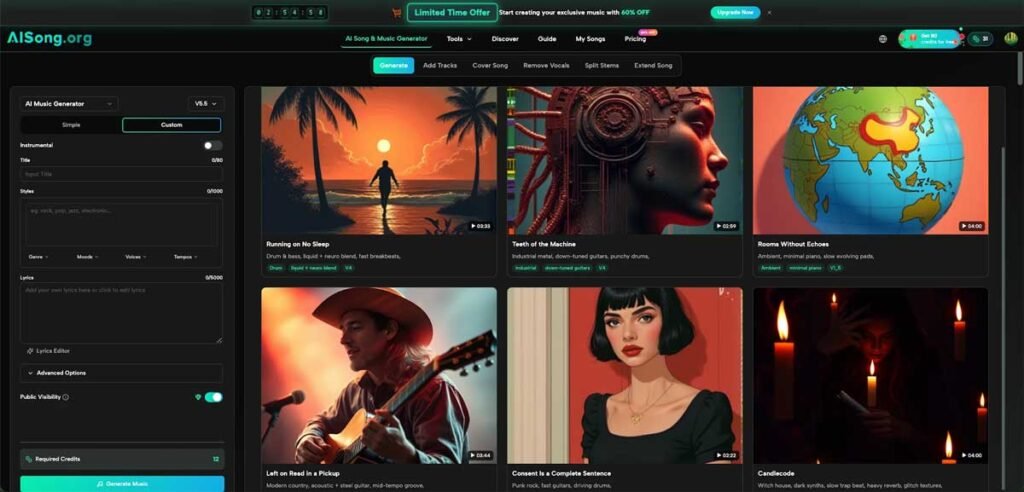
Most beginner-friendly AI music tools offer two entry points. A Simple Mode lets users describe what they want in plain language and receive a finished track quickly. A Custom Mode gives more control — allowing manual input of lyrics, style tags, genre, tempo, mood, and vocal type. Beginners should start with Simple Mode and gradually explore Custom as they get comfortable.
II. Choosing the Right Tool: What to Look For
Not all AI music tools are built the same. Before committing to one, check for these essentials:
- Genre variety — A capable AI Song Generator should support a wide range of styles, from pop and hip-hop to classical, jazz, rock, and electronic.
- Lyrics support — Look for built-in lyric generation and text-to-music conversion, so the vocals match the mood of the composition.
- Royalty-free output — Any track used in videos, podcasts, ads, or commercial projects needs to be free from copyright claims.
- Audio quality — Professional-grade output (44.1kHz or higher) matters when publishing to streaming platforms or YouTube.
- Editing and extension tools — The ability to extend a track, remove vocals, or remix sections adds significant flexibility.
III. A Step-by-Step Walkthrough for First-Time Users
Getting started with an AI Music Generator is simpler than most people expect. Here’s a practical breakdown of the process:
Step 1 — Describe Your Vision
Start by writing a short description of the music you want. Be specific about mood, genre, and purpose. “Cinematic orchestral track for a product launch video” will yield a better result than just “epic music.” The more context provided, the closer the output will be to what’s imagined.
Step 2 — Customize Style and Lyrics (Optional)
In Custom Mode, tags like genre, tempo, vocal type, and mood can be added manually. Lyrics can be written directly into the interface or generated automatically using a built-in AI Lyrics Generator. This feature produces complete verse-chorus-bridge structures with proper rhyme schemes, which is especially useful for songwriters who have a concept but struggle with the actual words.
Step 3 — Generate and Review
The generation process typically takes under five minutes. Once the track is ready, listen through the full composition before downloading. Most tools allow regeneration if the first result doesn’t match the vision.
Step 4 — Download and Use
Finished tracks can be downloaded as high-quality MP3 files. For professional projects requiring lossless audio, an MP3 to WAV conversion tool handles that step without any quality loss.
IV. Understanding the Toolset Beyond Basic Generation
A strong AI Music Maker doesn’t stop at song creation. The best tools bundle several production features into a single interface:
- Vocal Remover — Strips vocals from any uploaded audio file, producing a clean instrumental. Useful for karaoke, remixing, or creating backing tracks.
- Extend Song — Takes an existing generated track and adds new sections — extra verses, extended bridges, or full-length versions — while maintaining musical consistency with the original.
- Text/Lyrics to Music — Paste any written text or lyrics, and the system builds a matching musical composition around them, complete with vocals and instrumentation.
These tools work together as a complete production suite, removing the need to jump between separate apps for different tasks.
V. Commercial Use and Copyright: What Beginners Get Wrong
One of the most common misconceptions about AI-generated music is that it can’t be used commercially. That’s simply not true when using a tool that explicitly grants full commercial rights.
Every track created with AI Song comes with full commercial licensing — meaning it can be used in YouTube videos, advertisements, film projects, mobile apps, games, and podcasts without any risk of DMCA claims or copyright strikes. Ownership of the generated tracks belongs entirely to the creator. This is a significant practical advantage over licensed stock music, where usage restrictions vary and fees can add up.
VI. Tips for Getting Better Results
The quality of AI-generated music improves noticeably when the input is thoughtful. A few habits that make a real difference:
- Layer your descriptors — Combine genre, mood, tempo, and instrument references. “Slow-burn indie rock with acoustic guitar and reverb-heavy drums” gives the AI more to work with than “indie rock.”
- Use the lyrics editor for fine-tuning — After auto-generating lyrics, read through them carefully. Minor edits to word choices or syllable counts can significantly improve how the vocals sit in the final mix.
- Generate multiple versions — Don’t settle on the first output. Running the same prompt two or three times often produces noticeably different takes, and one will usually stand out.
- Match music to platform — Think about where the track will be used. A 15-second social media clip needs a different energy than a 3-minute podcast intro.
VII. Who Benefits Most from AI Music Tools
AI Music generation tools serve a wide range of users, and the learning curve is genuinely low:
- Content creators who need original background music for videos without paying licensing fees
- Indie musicians looking to build demos, test song concepts, or experiment with genres outside their primary skill set
- Podcasters who want custom intro and outro tracks that match their show’s tone
- Game developers and app builders who need royalty-free background audio at scale
- Educators and students exploring music theory or composition in a hands-on way
The barrier to entry has dropped to near zero. A clear idea and a few minutes are all it takes to walk away with a finished, professional-sounding track — something that would have taken a full studio session just a few years ago.
Conclusion
AI music generation has removed nearly every barrier that once made music production inaccessible. For anyone starting out, AI Song is a practical, all-in-one starting point — covering everything from track creation and lyric writing to vocal removal and format conversion. Pick a concept, run a generation, and build from there.
